
Turn Long Articles into Clear Takeaways.
Extract clean narrative text from supported web articles and generate concise, structured key points directly inside Google Chrome's native Side Panel. Powered by Chrome's local Gemini Nano model—no cloud AI servers, no user accounts, and completely free.
Available for desktop Google Chrome. Local AI availability varies by device and Chrome setup.
- On-Device AI (Local Processing)
- 100% Free Utility (No Subscriptions)
- No Accounts or Signups Required
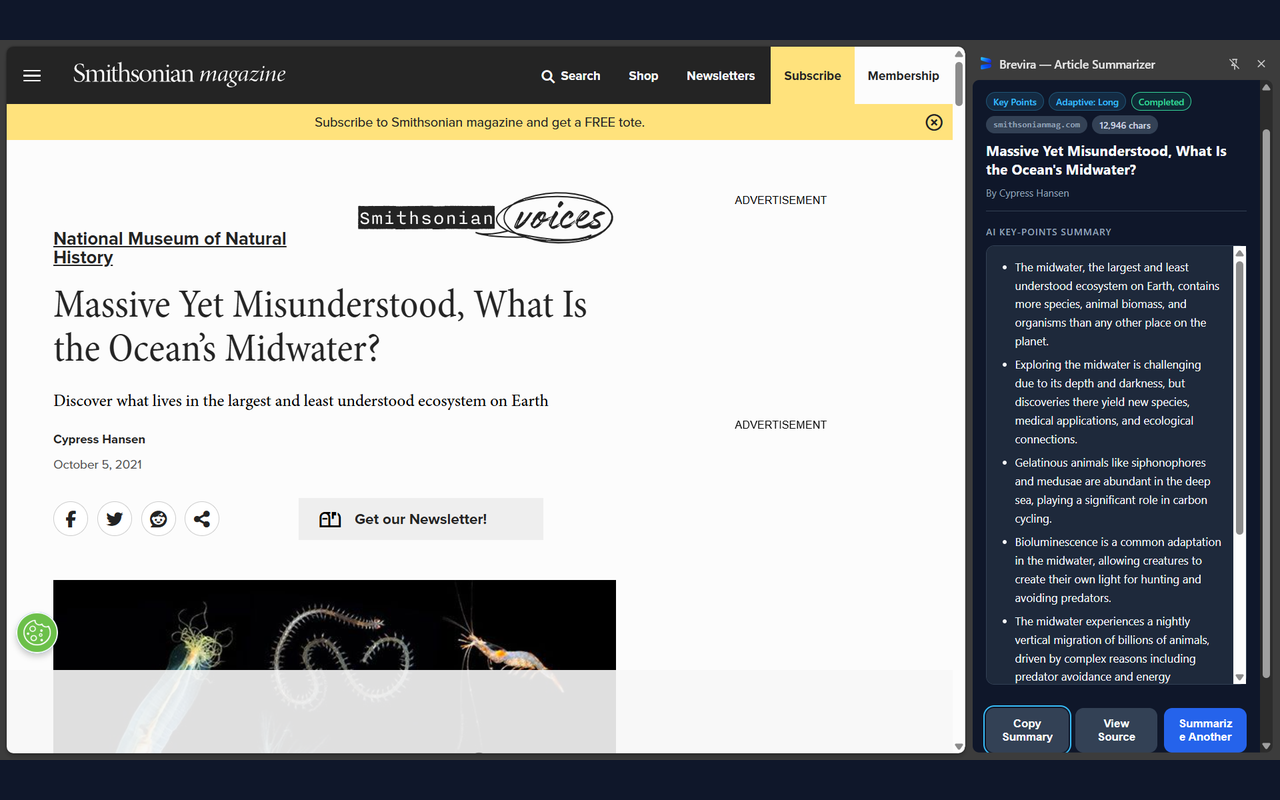
Experience Brevira in Chrome's Native Side Panel
Explore authentic screenshots of Brevira running on a live editorial publication in Google Chrome. Switch between actual generation stages to see how on-device AI generates concise takeaways alongside your article.

A Better Way to Read In-Depth Articles
Long-form essays, research preprints, and deep industry reporting offer high value, but extracting key points often creates friction. Brevira provides a focused, on-device solution.
In-Situ Reading Context
Navigating away from lengthy articles or copying text into separate tools disrupts your reading flow. Brevira opens directly alongside your tab in Chrome's native Side Panel, allowing you to review structured key points while scrolling the original source text.
Local Data Processing
Reading proprietary briefs, academic drafts, or personal articles requires cautious data handling. Brevira processes text entirely on your computer's local hardware via Chrome's built-in Gemini Nano model without transmitting article content to external AI servers.
Direct, Frictionless Access
Getting straight to substantive takeaways shouldn't require complex account setups, credit card forms, or recurring fees. Because on-device AI uses your machine's processor, marginal inference compute cost is $0. Brevira is offered completely free with zero signups.
Four Simple Steps from Long Article to Key Insights
Designed for focused reading. After Chrome's initial AI model setup, summarize supported articles directly in your side panel.
Open a Supported Web Article
Navigate to any supported long-form article, essay, or blog post containing readable narrative text in Google Chrome.
Click the Brevira Icon
Tap the Brevira icon in your browser toolbar to open the native Side Panel directly alongside your active tab without covering page content.
One-Click Local Extraction
Mozilla Readability isolates the article's core narrative text from an in-memory DOM clone, keeping the original page completely untouched.
Read Structured Key Points
Chrome's built-in Gemini Nano model processes the article locally, generating bulleted takeaways formatted in clean Markdown. Copy or inspect anytime.
Designed for Depth, Built for Focus
Every feature in Brevira is purposefully designed to enhance reading efficiency, maintain factual grounding, and eliminate distractions.
Native Chrome Side Panel Integration
Built specifically on Chrome's Manifest V3 sidePanel API. Remains securely pinned alongside your article as you scroll, read, and cross-reference claims without popups dismissing on outside clicks.
Non-Destructive Content Extraction
Powered by Mozilla Readability. Parses an in-memory DOM clone (doc.cloneNode(true)) so the active webpage's layout, interactive scripts, and visual elements remain 100% untouched.
Section-Aware Proportional Sampling
For longer articles, Brevira samples content across substantive headings, bringing representative context from different sections into the summarization process rather than truncating solely from the bottom.
Adaptive Summary Depth
Automatically selects Short, Medium, or Long summary depth based on article character volume and substantive heading count, matching the requested summary depth to the article's overall scale and structure.
Multi-Tab Session Memory
Retains completed summaries in temporary tab-keyed session storage across browser tabs. Switch between research sources freely without losing previously generated summaries.
Transparent Model Lifecycle
Clear status indicators for AI model availability (available, downloadable, unavailable), live setup progress bars, and truthful background cancellation controls.
Local Processing: How On-Device AI Handles Your Data
Brevira operates on a strict local execution boundary. Article narrative text is isolated in your browser and summarized by your computer's hardware.
Extension Data Handling Principles
- Zero External AI Server Routing: Article text is summarized locally by Gemini Nano directly on your computer's local hardware.
- Ephemeral Memory Storage: Active summaries exist strictly in volatile memory and temporary tab-keyed
sessionStorage, automatically deleted when tabs close. - Readability Isolation: Text is extracted from an in-memory clone (
doc.cloneNode(true)); live webpage scripts and DOM remain completely unaltered.
Website Privacy & Platform Separation
- Zero Website Tracking: This marketing website loads zero third-party analytics libraries, zero tracking pixels, and zero ad beacons.
- Zero Tracking Cookies: No cookies or persistent tracking identifiers are set during your visit.
- Platform Update Distinction: Standard browser-level operations, such as Chrome's initial model weight downloads, are handled directly by Google Chrome update servers as detailed in Brevira's Privacy Policy.
Device Compatibility & Chrome Environment
Brevira uses Chrome's built-in AI to process articles directly on your device. AI availability and performance can vary depending on your device and Chrome environment.
Desktop Google Chrome
Supported on Desktop Workstations
Built for desktop Google Chrome on Windows, macOS, Linux, and ChromeOS (Chromebook Plus devices). Mobile browsers (Android and iOS) are not currently supported.
Local Processing Architecture
Chrome Built-in AI (Gemini Nano)
Google Chrome manages the built-in AI model directly. Summarization runs locally on your machine without transmitting text to external AI servers.
Device & Environment Factors
Availability Varies by Device
Actual AI availability and generation performance can differ across devices. An NPU, GPU, or modern processor does not alone guarantee model support.
Automatic Model Staging
Guided Setup & Live Status
Users can try Brevira and check actual status in the side panel. If Chrome requires an initial download, Brevira guides you with a live progress bar.
Everything You Need to Know About Brevira
Straightforward answers regarding on-device AI, system prerequisites, privacy architecture, and supported features.
How can Brevira be completely free with no monthly subscription?
Brevira is built to run entirely on Google Chrome's built-in AI model (Gemini Nano), which executes locally on your computer's hardware. Because summarization runs on your local hardware with $0 marginal server compute cost, Brevira is offered completely free of charge without paywalls, subscriptions, or tiered accounts.
Does Brevira transmit my reading history or article content to any servers?
No. Brevira operates under an on-device architecture. When you summarize a supported article, the text is extracted and processed locally inside your browser. Brevira's extension code does not transmit your article text, URLs, titles, or summaries to external AI servers or analytics platforms. Voluntary actions you initiate (such as sending a support email or joining Discord) are handled directly through those respective services.
Will Brevira work on my device if I have an NPU, GPU, or modern processor?
Brevira relies on Google Chrome's built-in AI (Gemini Nano) via Chrome's native Summarizer API. While modern processors, dedicated graphics cards (GPUs), or Neural Processing Units (NPUs) can assist with on-device machine learning workloads, the presence of specific hardware components alone does not automatically guarantee that Chrome has enabled its built-in AI for your device.
Google Chrome directly manages model availability and determines whether local execution is supported in your specific browser environment. Because compatibility is determined by Chrome rather than a fixed hardware checklist, the most reliable way to find out is to install Brevira and check its setup card directly in the side panel. As Chrome's on-device AI ecosystem matures, device compatibility may continue to expand over time.
Why isn't Brevira working on my device, and how can I troubleshoot it?
Several factors can affect whether Brevira's AI summarization is available on your device.
Possible reasons:
- AI model not downloaded: Chrome may not have downloaded or completed setting up its built-in AI model.
- Device or browser availability: Chrome may report that its built-in AI model is currently unavailable for your device or browser environment.
- Chrome version or settings: Your Chrome installation may need updating, or its on-device AI functionality may be disabled or restricted.
- Initial model download interrupted: An internet connection, available storage, or Chrome's model setup process may prevent the model from becoming ready.
- Unsupported article content: The current webpage may not contain enough readable article content for Brevira to summarize (under 200 characters of narrative text), or may be an unsupported format such as a standalone PDF or dynamic web application dashboard.
Note: There is a clear distinction between device compatibility issues and unsupported webpage content. If Brevira reports "Content Too Short" or an extraction notice, the AI engine is functioning properly, but the active page does not contain standard article narrative text.
Troubleshooting Steps:
- Update Google Chrome to the latest available version on your desktop.
- Check that Chrome's On-device AI setting is enabled, where available.
- Open Brevira and check its AI model availability or setup status.
- If the model requires downloading, follow Brevira's setup instructions and allow Chrome to complete the download.
- Keep an active internet connection during initial setup.
- Once setup is complete, reopen or retry Brevira on a supported article.
- If the problem continues, contact our support team.
Advanced Diagnostics (Optional): For advanced troubleshooting, you can inspect Chrome's built-in AI model status through chrome://on-device-internals in your Chrome address bar. This is a technical diagnostic tool and is completely optional for everyday users.
Still experiencing an issue? Contact us at brevira.support@gmail.com. Include your Chrome version, device model and a screenshot of the issue so we can investigate and help you.
We're working to expand Brevira's availability so more users can benefit from on-device AI summarization. We'll share confirmed updates through our official channels as compatibility improves.
Thank you for supporting Brevira!
What happens during the first-time setup?
If Chrome has not previously downloaded its on-device AI model components, Brevira will display a "Setup Required" card. Clicking "Download AI Model" prompts Chrome to download the necessary model weights in the background. Brevira displays a live progress bar tracking setup progress. Once complete, Brevira is ready for local offline summarization.
Can Brevira summarize paywalled articles, PDFs, or web applications?
Brevira extracts text from supported web articles rendered in your active browser tab using Mozilla Readability. If you have legitimate access to view the article text on your screen (e.g., through an active personal subscription), Brevira can extract and summarize that visible text locally. Brevira does not bypass paywalls or access content restricted by servers. Standalone local PDF files and dynamic web application interfaces lacking narrative text are not currently supported.
Does Brevira work on mobile devices (Android or iPhone)?
No. Brevira is built exclusively for desktop Google Chrome. Mobile browsers (including Chrome on Android and iOS Safari) do not currently support Chrome's native side panel APIs or desktop Web AI APIs.
Why does Brevira request activeTab, scripting, and sidePanel permissions?
Brevira strictly adheres to the principle of least privilege. It avoids broad host permissions (<all_urls>). The activeTab permission grants temporary access to read the active webpage only when you explicitly click the Brevira icon. The scripting permission injects Mozilla Readability to isolate narrative article text from page clutter. The sidePanel permission allows Brevira to display its interface cleanly alongside your tab.
How do I contact support or join the community?
You can reach out directly by emailing brevira.support@gmail.com or by joining our official community Discord server at https://discord.gg/86yTYQw3X3.
Experience Focused, Private Web Reading Today
No accounts, no paywalls, and local AI processing directly in your browser. Install the free Chrome extension and start turning long-form articles into clear takeaways.
Available for desktop Google Chrome on Windows, macOS, Linux, and ChromeOS (Chromebook Plus devices). On-device AI availability varies by device setup.